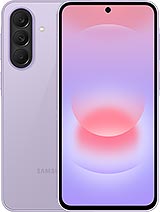
SM-A576W/Galaxy A37 5G SM-A376W specifications Expand
Released 2026, April 9
196g, 7.4mm thickness
Android 16, up to 6 major upgrades
128GB/256GB storage, no card slot

SM-A576W/Galaxy A37 5G was announced at 2026, March 25 with Android 16, up to 6 major Android upgrades, One UI 8.5, have chipset Exynos 1480 (4 nm) CPU Octa-core (4x2.75 GHz Cortex-A78 & 4x2.0 GHz Cortex-A55) and GPU Xclipse 530. It have 128GB 6GB RAM, 128GB 8GB RAM, 256GB 8GB RAM, 256GB 12GB RAM storage and there are colors: Graygreen, Charkoal, White, Light Violet

NETWORK
Technology
GSM / HSPA / LTE / 5G
2G
GSM 850 / 900 / 1800 / 1900
3G
HSDPA 850 / 900 / 1700(AWS) / 1900 / 2100
4G
1, 2, 3, 4, 5, 7, 8, 12, 17, 20, 25, 26, 28, 32, 38, 40, 41, 66
5G
1, 3, 5, 7, 8, 20, 28, 38, 40, 41, 66, 77, 78 SA/NSA/Sub6
Speed
HSPA, LTE, 5G
TIMELINE
Announced
2026, March 25
Released
Released 2026, April 9
BODY
Dimensions
162.9 x 78.2 x 7.4 mm (6.41 x 3.08 x 0.29 in)
Weight
196 g (6.91 oz)
Build
Glass front (Gorilla Glass Victus+), plastic frame, glass back (Gorilla Glass Victus+)
SIM
· Nano-SIM + eSIM· Nano-SIM + Nano-SIM + eSIM + eSIM (max 2 at a time)
DISPLAY
Type
Super AMOLED, 120Hz, 1200 nits (HBM), 1900 nits (peak)
Size
6.7 inches, 110.2 cm2 (~86.5% screen-to-body ratio)
Resolution
1080 x 2340 pixels, 19.5:9 ratio (~385 ppi density)
Protection
Corning Gorilla Glass Victus+, Mohs level 5
PLATFORM
OS
Android 16, up to 6 major Android upgrades, One UI 8.5
Chipset
Exynos 1480 (4 nm)
CPU
Octa-core (4x2.75 GHz Cortex-A78 & 4x2.0 GHz Cortex-A55)
GPU
Xclipse 530
MEMORY
Card slot
No
Internal
128GB 6GB RAM, 128GB 8GB RAM, 256GB 8GB RAM, 256GB 12GB RAM
UFS 3.1
MAIN CAMERA
Camera
50 MP, f/1.8, (wide), 1/1.56", 1.0µm, PDAF, OIS 8 MP, f/2.2, 16mm (ultrawide), 1/4.0", 1.12µm 5 MP, f/2.4, (macro)
Features
LED flash, panorama, HDR
Video
4K@30fps, 1080p@30/60fps, gyro-EIS
FRONT CAMERA
Camera
12 MP, f/2.2, (wide), 1/3.2", 1.12µm
Video
4K@30fps, 1080p@30fps, 10-bit HDR
SOUND
COMMUNICATES
WLAN
Wi-Fi 802.11 a/b/g/n/ac/6, dual-band, Wi-Fi Direct
Bluetooth
5.4, A2DP, LE
GPS
GPS, GALILEO, GLONASS, BDS, QZSS
NFC
Yes (market/region dependent)
Radio
No
USB
USB Type-C 2.0, OTG
FEATURES
Sensors
Fingerprint (under display, optical), accelerometer, gyro, compass
Virtual Proximity Sensing
BATTERY
Battery
5000 mAh
MISC
Colors
Graygreen, Charkoal, White, Light Violet
SAR US
0.81 W/kg (head) 1.17 W/kg (body)
SAR EU
0.72 W/kg (head) 1.14 W/kg (body)
Performance
AnTuTu: 697795 (v10), 912055 (v11) GeekBench: 3345 (v6) 3DMark: 1035 (Wild Life Extreme)

Specs source: gsmarena.com
Disclaimer. We can not guarantee that the information on this page is 100% correct

Filter firmware

Samsung firmware SM-A576W/Galaxy A37 5G SM-A376W 4

Device CSC Version Bit/SW REV.
Sec. Patch Lvl.
Sec. Patch Lvl. OS / OneUI Build date
SM-A576W/Galaxy A37 5G XAC A376WVLS3AZE1 3  2026-05-05  Full Files B(Android 16) One UI 8.5 20260520193041
SM-A576W/Galaxy A37 5G XAC A376WVLU2AZD6 2  2026-04-05  Full Files B(Android 16) One UI 8.5 20260428142451
SM-A576W/Galaxy A37 5G XAC A376WVLS2AZC4 2  2026-04-05  Full Files B(Android 16) One UI 8.5 20260402195411
SM-A576W/Galaxy A37 5G XAC A376WVLU1AZB7 1  2026-01-01  Full Files B(Android 16) One UI 8.5 20260220155911
Lastest combinations SM-A576W/Galaxy A37 5G SM-A376W

We are working hard to figure it out

You can request or contribute combination for this model to Telegram group

 How to flash Samsung SM-A576W/Galaxy A37 5G SM-A376W firmware

1. Extract (unzip) the Samsung firmware file. Recommended using WinRAR or 7-Zip

2. Download Odin Tool 3.13.1

3. Extract Odin ZIP file

4. Open Odin execute file

5. Reboot Samsung phone in Download Mode (hold Home + Power + Volume Down buttons / hold Volume Down + Bixby buttons then plug-in cable)

6. Connect you Samsung phone and wait until you get a blue sign in Odin

7. Add the 1 file Samsung firmware to AP/PDA or 4 files Samsung firmware (AP/BL/CP/CSC) to it's slots

8. Make sure re-partition is NOT ticked

9. Click the START button, sit back and wait few minutes

Comment with us

I am so sorry! 😟

But please disable AdBlock. Because Samfw is Free. But we need money to keep server running. Ads is only benifit for keep Samfw running Free. Thank you!

👍 Understood. I turned it off ❓ How to disable AdBlock/AdBlockPlus? 👑 Upgrade to Premium membership with Ads free and special permissions
😔 I do not want to help

How to disable AdBlock

Adblock / Adblock Plus   
  • Click AdBlock or AdBlock Plus icon at the browser menu.
  • Click Don't run on pages on this site. or Enabled on this site then press Exclude or Switch off BLOCK ADS ON